Managing Hundreds of Social Media Accounts: How to Go from "Firefighter" to "Strategic Commander"?
Do you also experience mornings like this? You open your computer to find over a dozen browser windows crammed together, each logged into a different Facebook ad account. You need to check the ad performance of Account A, respond to customer inquiries in Account B's inbox, post updates for a new product launch on Account C's shop, all while ensuring the daily activity of Accounts D, E, and F... In the chaos, it's easy to accidentally reply with the wrong identity or neglect the maintenance of a crucial account. For those involved in cross-border marketing, e-commerce operations, or advertising agencies, managing multiple Facebook accounts single-handedly is the norm. However, when this number jumps from a few to dozens, or even hundreds, the challenge escalates from "cumbersome" to "an impossible task."
The Reality of Multi-Account Management: Efficiency, Security, and Mental
With the trend of globalization and refined marketing, it's standard for businesses to have multiple Facebook accounts (personal profiles, Business Managers, ad accounts). The reasons are diverse: to differentiate between different national markets, operate separate brands, manage multiple clients' ad accounts, or to diversify risk for A/B testing. However, the underlying logic of Facebook account management is designed for individual users, and its platform rules and security mechanisms are extremely unfriendly to "one-to-many" operational modes.
The real-world pain points are very specific:
- Efficiency Bottleneck: Traditional sequential login, switching, and operation consume a massive amount of repetitive labor time. Posting the same promotional message to 100 groups or pages might take an entire day.
- Security Minefield: Frequently switching logins between different accounts on the same device or network environment can easily trigger Facebook's security alerts, leading to account linking, restricted features, or even outright bans. This is the deepest fear of all operators.
- Management Chaos: The lack of a unified dashboard prevents simultaneous oversight of all account health statuses, ad spend, or engagement data, forcing decisions based on pieced-together, fragmented information.
- Collaboration Difficulties: Sharing account passwords within a team is both risky and inconvenient, with crude permission management and difficulty in tracing operational records.
Common "Workarounds" and the Ceiling of Professional Tools
Facing these pain points, practitioners have tried various methods. Initially, it might involve a personal password notebook supplemented by the browser's multi-user functionality. Later, they might turn to basic multi-tab browser tools or virtual machine software to create independent login environments for each account. More professional teams might even build their own complex RPA (Robotic Process Automation) scripts.
However, these methods quickly hit their ceiling. Manual and semi-automated approaches essentially digitize manual labor without solving the core problem. Virtual machine solutions, on the other hand, consume immense hardware resources and are costly to manage. Self-developed automation scripts are not only difficult to develop and maintain but also extremely fragile; a minor change in Facebook's front-end code can cause the entire process to collapse. More importantly, these methods often only solve the "login" problem, failing to systemically address the complex demands of bulk operations, anti-association security, and team collaboration.
The Core Logic of Finding a Solution: Isolation, Batching, and Secure Automation
After countless pitfalls, we realize that an ideal solution must be built upon several core logics:
- Physical-Level Isolation is the Foundation of Security: Each account's login environment must be completely independent in terms of browser fingerprints, IP addresses, cookies, cache, and other dimensions, simulating a genuine "different device and network" state to fundamentally eliminate association risks detected by the platform.
- Bulk Operations are the Engine of Efficiency: Encapsulate repetitive, standardized actions (such as login, posting, replying, adding friends) into "one-click" batch tasks, freeing operators from mechanical labor.
- Centralized Control is the Management Hub: A unified console is needed to monitor all account statuses in real-time, clearly allocate team permissions, and generate auditable operation logs.
- Stability and Anti-Ban Measures are the Lifeline: The tool itself needs to deeply understand platform rules, simulate human-like operational behavior, and provide contingency plans for verification and risk control measures to ensure business continuity and account asset security.
How to Reshape Your Workflow with Professional Platforms: Taking FBMM as an Example
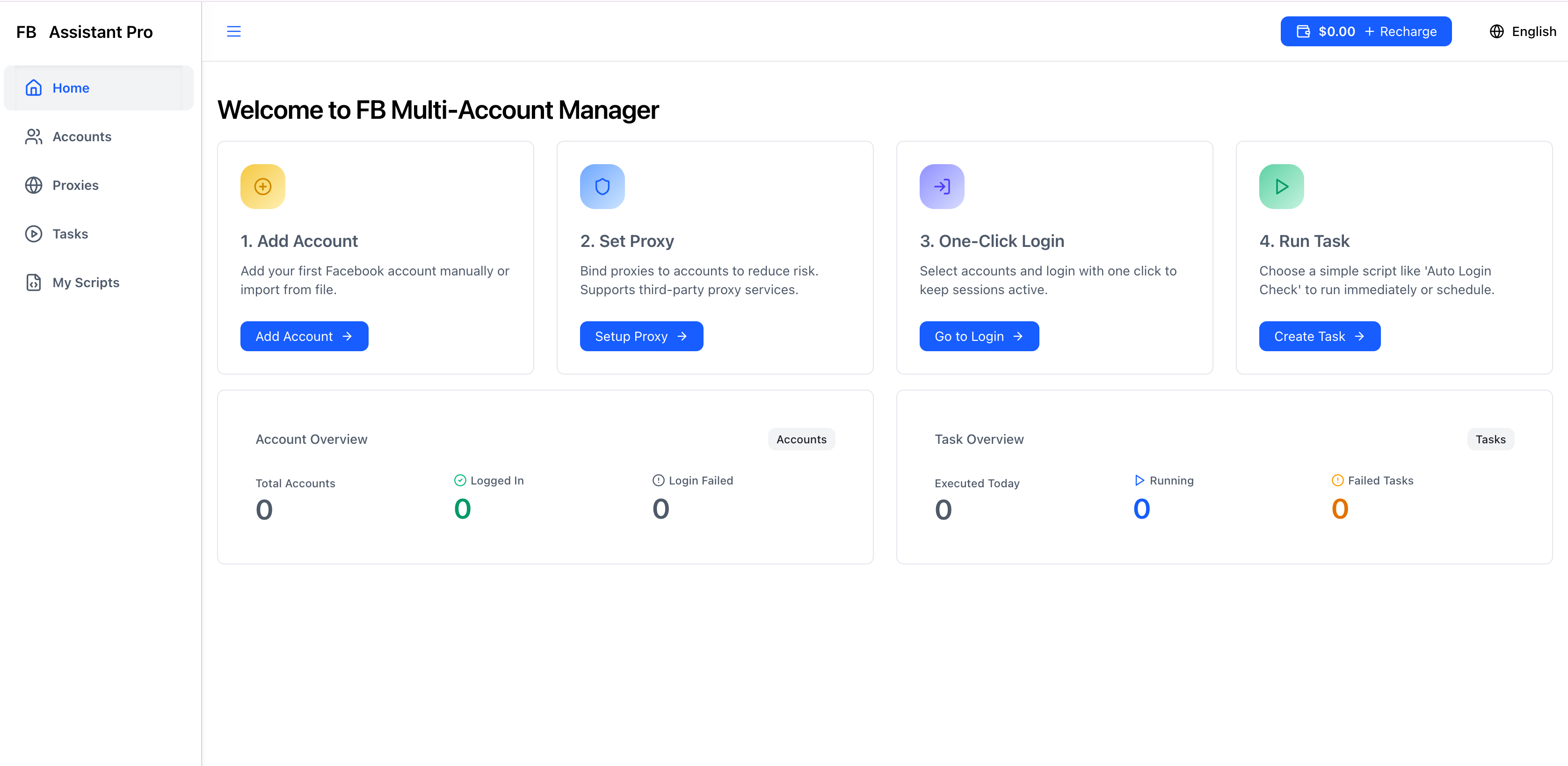
Based on the logic above, SaaS platforms focused on solving multi-account management challenges, such as FBMM (Facebook Multi Manager), have emerged. Its value lies not in replacing human creativity and strategy, but in freeing operators from high-risk, low-value execution tasks, allowing them to focus more on core work like content, strategy, and data analysis.
It primarily reshapes workflows from the following aspects:
- Environment Isolation and Secure Login: The platform provides a clean, independent browser environment for each Facebook account. This means that when you batch log in to dozens of accounts with a single click, each account appears to Facebook's system as if it's from a brand-new, unrelated device. This resolves the biggest security risks of manual switching or regular multi-tab tools.
- Efficient Window Management and Batch Tasks: After logging in, facing dozens of open account windows, how can you efficiently view and operate them? The window arrangement feature allows you to instantly organize all windows in a custom grid layout (e.g., 4x4) and supports synchronized scrolling and batch refreshing. More importantly, you can record actions like posting and interacting as "tasks" and then batch them out with one click to selected account groups for execution, resulting in exponential, not linear, efficiency gains.
- Team Collaboration and Permission Control: Within FBMM's team management, you can invite members and assign granular permissions based on "account groups" or specific feature modules. Newcomers can operate within authorized scopes without needing account passwords, and all actions are logged, achieving a balance between security and efficiency.
A Real-World Daily Operation Scenario Comparison
Let's compare how Xiao Zhang, an operations supervisor at a cross-border e-commerce company, completes his daily fixed workflow using traditional methods versus using FBMM:
Traditional Mode (9:00 AM - 12:30 PM):
- Login (30 minutes): Open the Excel password sheet, copy and paste account passwords one by one, and log in in browser incognito windows, for a total of 15 main accounts. This period might trigger 1-2 security verifications.
- Check and Interact (60 minutes): Switch back and forth between 15 browser tabs to check notifications and reply to important messages. Frequent switching causes computer lag and mental fatigue.
- Content Publishing (45 minutes): Upload prepared product post copy and images sequentially to 15 different fan pages. Repeating the operation 15 times is highly prone to errors.
- Ad Account Check (30 minutes): Individually access Business Manager and record key ad data into a spreadsheet. Total: Approximately 3.5 hours, high mental stress, high account association risk.
Mode After Using FBMM (9:00 AM - 10:15 AM):
- Batch Login and Arrangement (5 minutes): Select 15 accounts in the FBMM console and click "Batch Login." After login, use the "window arrangement" feature to neatly arrange the 15 windows on the screen.
- Centralized Check and Batch Interaction (40 minutes): Quickly scan the arranged windows. Use the "Batch Posting" function to publish prepared content to all selected pages at once (1 minute). Utilize automated scripts to automatically handle common fan message replies.
- Data Overview and Export (30 minutes): Through integration or API, view key metrics of all ad accounts in a separate data panel and generate reports with one click. Total: Approximately 1.25 hours, calm operation, controllable risk, with saved time available for data analysis or planning new marketing campaigns.
| Comparison Dimension | Traditional Manual / Scattered Tools | After Using Professional Platforms like FBMM |
|---|---|---|
| Login Efficiency and Security | Slow, high risk, easy to trigger verification | One-click batch login, environment isolation, secure and efficient |
| Daily Operation Efficiency | Repetitive labor, time-consuming, prone to errors | Batch task processing, efficiency increased several to tens of times |
| Account Security Management | Relies on personal experience, uncontrollable risk | System-level anti-association design, auditable operations |
| Team Collaboration | Password sharing, chaotic permissions, insecure | Granular permission allocation, no password sharing needed |
| Operator Status | "Firefighter," busy with execution | "Strategic Commander," focused on analysis and decision-making |
Conclusion: Invest Time in Growth, Not Repetition
Managing a massive number of social media accounts is essentially a battle against efficiency, security, and complexity. The key to success is not to become busier or click the mouse faster, but to use the right "leverage." By standardizing, automating, and securing repetitive, high-risk operations, professional multi-account management platforms like FBMM provide precisely that leverage.
It transforms "managing 100+ accounts single-handedly" from an anxiety-inducing headline into an efficient and orderly daily routine. The real value lies in its ability to liberate the most precious resources of operators and marketing experts – time and attention – allowing us to refocus our energy on content creativity, market strategy, and user growth, activities that truly drive business forward. If you're also struggling in the mire of multi-account management, it might be time to re-evaluate your workflow and consider how to leverage the right tools to free yourself from tedious execution.
Frequently Asked Questions FAQ
Q1: Will using this type of multi-account management tool lead to a Facebook ban? A: No tool can guarantee 100% ban exemption. However, the core value of professional tools lies in maximizing risk reduction. By simulating a real user environment (independent fingerprints, IP addresses), controlling operation frequency and rhythm, and providing solutions for verification codes, it allows you to perform bulk operations safely within a compliant framework, which is far safer than rough manual switching or using unknown scripts.
Q2: I need to manage hundreds of accounts. Are the computer hardware requirements high? A: Compared to traditional virtual machine solutions, modern SaaS platforms (like FBMM) have better resource consumption optimization. They typically run browser environments in the cloud, with your local computer primarily serving as a control terminal. Therefore, the pressure on local hardware (especially CPU and memory) is significantly reduced. For specific requirements, it's recommended to check the official recommended configuration.
Q3: How are these types of tools priced? Are they suitable for our small team or freelancers? A: Pricing models are usually subscription-based, either by the number of managed accounts or by feature modules. Many platforms offer tiered pricing, and some even have introductory packages for individuals or small teams. For freelancers or small teams, the key is to calculate the value of time saved and avoided ban risks; the return on investment is often quite substantial.
Q4: Can they manage other social media accounts besides Facebook? A: Tools that specialize in deeply exploring one platform (like Facebook) often have advantages in compatibility, security, and functional depth on that platform. Some platforms may also gradually support other mainstream social media. When choosing, you should first clarify whether your core pain points are concentrated within the Facebook ecosystem, which is an important basis for deciding between a specialized tool or a general-purpose one.
Q5: How do I start migrating my existing accounts to this type of management platform? A: A robust process involves: first, start by testing with your most important or newly registered accounts; become familiar with the platform's batch login, environment isolation, and basic operations; then, gradually migrate non-core accounts; finally, utilize the platform's batch task features to restructure your daily operational SOPs (Standard Operating Procedures). Throughout the process, pay attention to adhering to platform rules and avoid performing an unusually large number of operations on accounts in a short period.
📤 Share This Article
🎯 Ready to Get Started?
Join thousands of marketers - start boosting your Facebook marketing today
🚀 Get Started Now - Free Tips Available