Why "Proxy Binding" Determines the Success of Your Facebook Multi-Account Operations
In the realms of cross-border e-commerce, overseas marketing, and social media operations, managing multiple Facebook accounts has become commonplace. Whether for brand matrix deployment, A/B testing advertisements, or diversifying operational risks, the need for multi-account operations is a genuine reality. However, many practitioners initially focus on content creation, advertising, or follower growth, neglecting a more fundamental and potentially fatal issue: account association and security. Have you ever experienced several meticulously managed accounts being banned without warning? The root cause might have been sown from the very first step.
The Reality of Multi-Account Operations: A Trade-off Between Security and Efficiency
For teams or individuals managing multiple Facebook accounts, the core conflict lies in how to maximize operational efficiency while ensuring the maximum possible independence and security for each account. In reality, many operators, for the sake of convenience, log into different accounts sequentially on the same computer or within the same browser, or use simple multi-tab browser plugins.
While seemingly efficient, this approach carries extremely high risks. Facebook's risk control system constantly collects and analyzes user behavior data. Among this, IP addresses, browser fingerprints, and device information are the key determinants of whether accounts are associated or exhibiting abnormal activity. Once the system identifies multiple accounts originating from the same real physical or network environment, these accounts are flagged as "associated accounts." If one account is banned for any reason (e.g., violating content rules, receiving numerous reports, payment issues), other associated accounts are highly likely to be "jointly punished," causing the entire operational matrix to collapse instantly.
"One Device, Multiple Accounts" and Shared Proxies: Fatal Flaws in Common Practices
Faced with risk control, some experienced operators realize the need to change IPs. They might then resort to the following methods:
- Using Public or Shared Proxies: Purchasing cheap public proxy IP pools and manually switching them when logging into different accounts. However, these IPs are typically shared by hundreds or thousands of users and have long been flagged by Facebook as high-risk or junk IPs. Logging in with such IPs is akin to "walking into a trap."
- Using Virtual Machines (VPS) or Cloud Servers: Configuring a separate remote virtual machine for each account. While this achieves physical environment isolation, it is costly, complex to manage, and significantly compromises operational fluency, making it unsuitable for social media operations requiring frequent content posting and interaction.
- Relying on Browser Fingerprint Modification Plugins: Attempting to deceive the system by altering browser fingerprint information such as Cookies, Canvas, and WebGL. However, Facebook's detection technology is constantly evolving, and such superficial disguises are increasingly easy to see through, nor do they address the fundamental issue of network-level (IP) association.
The common limitation of these methods is that they only solve part of the problem, either ignoring IP quality, sacrificing operational efficiency, or failing to achieve true, continuous environment isolation. More critically, they separate "environment isolation" from "account operation," forcing operators to engage in tedious manual operations of switching proxies, browser environments, and logging into accounts, which are prone to errors.
A Path to "Physical-Level" Isolation Based on Risk Control Logic
To operate multiple Facebook accounts securely, we must think backward from Facebook's risk control system's judgment logic. Its core objective is to identify "multiple accounts controlled by a single real person." Therefore, the key to counteracting this is to simulate a "independent real user" usage environment for each account.
This requires meeting several conditions:
- Independent Network Identity: Each account must have a long-term stable, clean, and exclusive IP address. Preferably, this IP should have a genuine residential network background (Residential IP) and be bound to the account, not shared with other accounts.
- Independent Device Fingerprint: The browser environment for each account (including hundreds of parameters such as Cookies, cache, user agent, screen resolution, fonts, plugin lists, etc.) must be unique and stable.
- Independent Behavior Patterns: Login times, operational habits, and even mouse movement trajectories should mimic real humans as much as possible, avoiding the regularity of automated scripts.
From this, the ideal solution emerges: Equip each Facebook account with a dedicated, long-term bound, clean proxy IP, and within this fixed IP environment, build a unique and persistent browser operating environment. This is the concept of "one device, one account, one IP" for physical isolation. It's no longer simple "switching" but a complete "binding" from the network layer to the device layer.
Implementing "Proxy Binding": How the fbmm Platform Simplifies Professional Processes
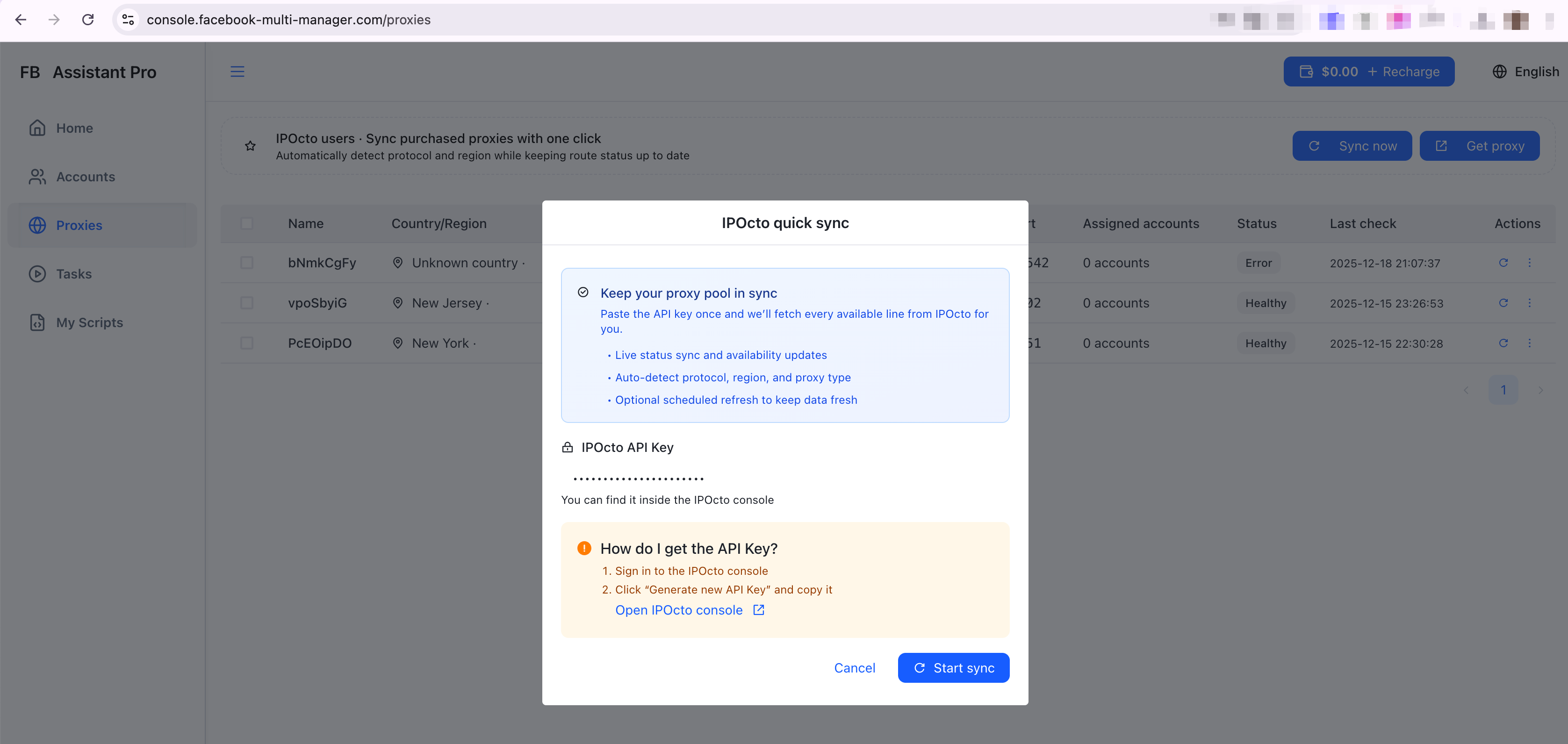
Understanding the importance of "proxy binding," its implementation remains technically challenging for most marketing teams. You need to find reliable proxy service providers, configure complex proxy settings, manually install browsers for each environment, and solidify fingerprints... the entire process is time-consuming and labor-intensive.
This is precisely where professional tools add value. Taking the fbmm platform as an example, it is designed to address this core pain point. The platform's core idea is to transform the professional and tedious "environment isolation" step into a simple, one-click user operation.
Its key lies in deep integration with professional proxy services (like ipocto.com). Users do not need to research proxy protocols or source high-quality IP resources themselves; instead, they can directly access and manage high-quality residential proxies within the platform. More importantly, fbmm allows you to permanently bind a specific, clean proxy IP to a specific Facebook account operating environment.
This means that after creating an operating environment for "Brand A's" account, you can manually associate an independent IP address and browser fingerprint. Subsequently, whenever you log into this environment to operate "Brand A's" account, it will always access Facebook through the same IP, and the browser environment information will remain unchanged. This, in Facebook's view, constructs a stable digital identity that fully conforms to the characteristics of an "independent real user."
A Real-World Multi-Account Ad Testing Workflow
Let's envision a common scenario: a cross-border e-commerce team is preparing to conduct Facebook ad tests for three new products (Products A, B, and C) in the European and American markets. They need to create separate ad accounts for each product to avoid interference between test data and to diversify the risk of account bans.
Traditional Inefficient Workflow:
- Purchase three sets of different proxy IPs.
- Install three different browsers on the main computer (or use incognito mode).
- Before each operation, manually configure the corresponding proxy IP for each browser (requiring memorization of complex IP, port, username, and password).
- Log into the account to operate, and after finishing, clear browser data just in case.
- Repeat steps 3 and 4 the next day, but manual proxy switching is highly prone to errors. It's possible to accidentally use Product A's IP from yesterday to log into Product C's account, causing association.
Efficient and Secure Workflow with the fbmm Platform:
- Within the fbmm platform, create three "independent environments" with one click, named "Product A_US," "Product B_UK," and "Product C_DE" respectively.
- During creation, select a clean residential IP from the integrated proxy pool (e.g., ipocto) for each environment and complete the binding. The platform automatically generates and solidifies a unique browser fingerprint for each environment.
- Subsequently, operators only need to open the fbmm client, click on the "Product A_US" environment icon, which will launch a browser window pre-configured with its dedicated US IP and independent fingerprint, allowing direct login to the corresponding Facebook account for ad creation, data viewing, and other operations.
- For operations on Products B and C, simply click on their respective environment icons. Each environment is completely physically isolated, with IPs, Cookies, and cache not interfering with each other.
- The IPs for all environments are permanently bound. Unless manually changed, each login will be consistent, significantly improving account stability.
| Comparison Dimension | Traditional Manual Method | Using fbmm Platform |
|---|---|---|
| Environment Isolation | Low, prone to association due to operational errors | High, achieving "one device, one account, one IP" physical-level isolation |
| IP Quality and Stability | Requires self-selection, quality varies, frequent switching | Integrates quality proxy service provider resources, IPs are clean and can be permanently bound |
| Operational Efficiency | Extremely low, significant time wasted on switching and configuration | High, one-click environment launch, focus on operations |
| Risk of Errors | High, manual operations are prone to confusion | Low, environments and accounts are visually mapped one-to-one |
| Team Collaboration | Difficult, configuration cannot be shared and is complex | Convenient, environment configurations can be saved and distributed to team members |
This workflow comparison shows that by automating proxy binding and environment management, teams are freed from tedious technical details and can dedicate all their energy to ad creative, audience targeting, and data analysis—the activities that truly create value.
Conclusion: Place Security Infrastructure Before Operational Strategy
In the "game" of Facebook multi-account operations, the rules are set by the platform (Facebook). Disregarding risk control logic and only pursuing superficial efficiency is akin to building a castle on shifting sand. The "environment isolation" concept, represented by "proxy binding," is not an optional technique but an unshakeable first line of defense for safe multi-account operations.
It constructs an independent "digital identity" for each account, fundamentally severing the risk of chain bans caused by environmental association. For cross-border marketers, e-commerce sellers, and advertising agencies seeking long-term, stable, and scaled operations, investing in and establishing such a reliable environment isolation and management system is more important foundational infrastructure than any short-term traffic trick. Only when account security is guaranteed can all subsequent content strategies, advertising placements, and growth methods have sustainable meaning.
Frequently Asked Questions FAQ
Q1: How exactly does Facebook detect multi-account association? What factors are involved besides IP? A1: Facebook employs multi-dimensional fingerprint identification technology. Key factors include: IP addresses (especially long-term login IPs), device fingerprints (browser type and version, operating system, screen resolution, installed fonts, plugin lists, Canvas rendering, and other hardware information), behavior patterns (login time regularity, operation speed, mouse trajectory), and even Cookies and local storage data. The system combines these pieces of information into a unique "device graph," and overly associated graphs are deemed to be controlled by the same entity.
Q2: I used a residential proxy IP, why was my account still banned? A2: Simply changing the IP is not enough. If you switch between different residential IPs to log into multiple accounts within the same browser environment (without clearing Cookies and cache), the browser fingerprint remains the same, and Facebook can still easily associate these accounts. It must be combined with independent browser environments (each account has its own exclusive browser instance with a solidified fingerprint) to be effective.
Q3: What is a "browser fingerprint"? Why is it difficult to modify? A3: A browser fingerprint is an identifier used to uniquely identify a device, formed by combining various pieces of information exposed by the browser (such as the user agent string, screen resolution, time zone, language, supported WebGL features, etc.). It includes dozens or even hundreds of parameters, many of which are deep hardware and software-level information. Simply using "incognito mode" or changing the user agent only modifies superficial parameters. Deep-level fingerprints (like Canvas fingerprint, AudioContext fingerprint) are difficult for ordinary users to alter completely and require specialized tools for systematic simulation and solidification.
Q4: How do platforms like fbmm achieve "one device, one account, one IP"? A4: These platforms typically achieve this by creating independent virtual browser profiles. Each profile is equivalent to a brand new, isolated browser installation instance, with its own independent Cookies, cache, local storage, and fingerprint information. The platform then permanently associates each of these virtual browser instances with a pre-configured and bound independent proxy IP. Each time a user operates, they are actually launching an independent browser window with an exclusive network identity, thereby achieving multiple completely isolated "virtual computers" on a single physical computer.
Q5: I need to manage hundreds of accounts for multiple team members. Is manually binding hundreds of proxy IPs realistic? A5: This is precisely the core value of automated management platforms. On platforms like fbmm, you can create hundreds or thousands of independent environments in batches and assign and bind proxy IPs to them via API or bulk import. You can then group these environments, tag them, and assign them to different team members for daily operations. The IP binding relationship for all environments is persistent, and team members do not need to worry about proxy configurations; they simply click on the corresponding environment to start working, greatly improving the feasibility and efficiency of large-scale account management. You can visit the fbmm official website to learn more about the functional details of batch management.
📤 Share This Article
🎯 Ready to Get Started?
Join thousands of marketers - start boosting your Facebook marketing today
🚀 Get Started Now - Free Tips Available